Make It at Home: The Honest Guide to Building Your Music from Bedroom to Streaming in 2024
Let's skip the part where we act like making music at home is some scrappy alternative to the "real" music industry. At this point, bedroom production is the music industry for a huge chunk of working artists in the US. Billie Eilish recorded her debut album in her brother's bedroom. Chance the Rapper built a career on music he gave away for free. The tools exist. The question is which ones are actually worth your money.
This isn't a sponsored post. It's just an honest look at what independent musicians need in 2024 to produce, record, and distribute their work—without burning through their savings or getting lost in a sea of gear they don't understand.
We've broken it down into five categories, with options at different price points, because not everyone is starting from the same place.
1. Your DAW: The Foundation of Everything
A DAW—Digital Audio Workstation—is the software where you'll record, arrange, mix, and produce your music. Choosing one is a big decision because you'll likely stick with it for years.
GarageBand (Free — Mac/iOS only) If you're on a Mac and just getting started, there's genuinely no reason not to begin here. GarageBand is free, surprisingly capable, and the learning curve is manageable. You can record live instruments, program beats, layer synths, and export finished tracks. A lot of artists have released real, professional-sounding music made entirely in GarageBand. Its main limitation is that it doesn't scale as well as paid options when your projects get complex.
Logic Pro ($199.99 one-time — Mac only) Think of Logic Pro as GarageBand's serious older sibling. The interface is familiar if you've used GarageBand, and the jump in capability is enormous—better mixing tools, more included plugins, and the ability to handle large, complex sessions. For Mac users who are ready to commit, it's one of the best values in music software.
Ableton Live (~$99–$749 depending on tier — Mac/PC) Ableton is the go-to for electronic music, loop-based production, and live performance. Its Intro tier is affordable, but most working producers use the Standard or Suite versions. It has a steeper learning curve than Logic, but the workflow—especially for producers who think in loops and layers—is unlike anything else.
FL Studio (~$99–$499 — Mac/PC) FL Studio has a passionate following, particularly in hip-hop and electronic music. It's a one-time purchase with lifetime free updates, which is genuinely rare and genuinely great. The pattern-based workflow is intuitive for beat-making and melodic composition.
Bottom line: Start with GarageBand if you're on Mac and unsure. Move to Logic when you're ready to invest. Go Ableton or FL if you're leaning into electronic or beat-driven music.
2. Your Microphone: Where the Sound Begins
You can have the best DAW in the world and ruin everything with a bad microphone. The good news is that excellent recording quality is achievable at a reasonable price.
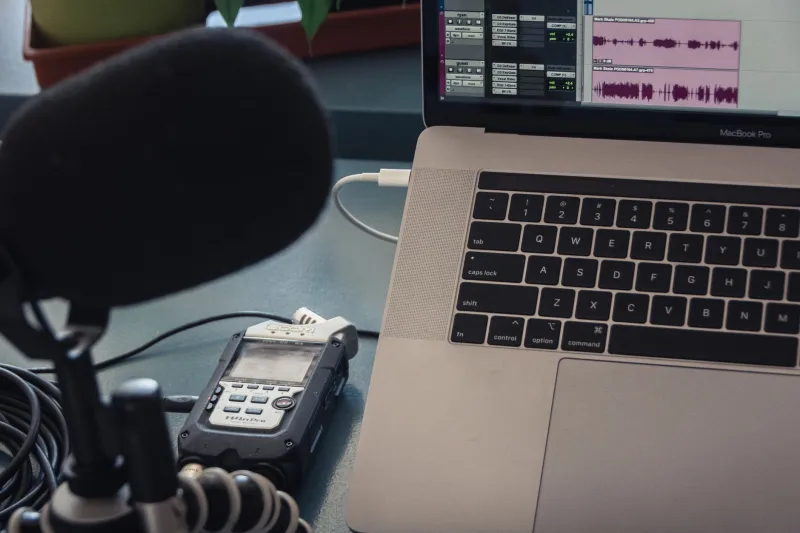
Audio-Technica AT2020 (~$99) This is the microphone recommendation you'll see everywhere, and there's a reason for that—it's genuinely excellent for the price. It's a condenser mic that handles vocals, acoustic instruments, and podcasting well. Pair it with a basic audio interface and you're recording at a professional-enough quality for most purposes.
Shure SM7B (~$399) The SM7B is a dynamic microphone that's become almost iconic in the podcasting and home studio world. It's warmer and more forgiving of room noise than most condensers, which matters a lot if your recording space isn't acoustically treated. More expensive, but a legitimate long-term investment.
Rode NT-USB Mini (~$99) If you want to skip the audio interface entirely and go straight USB, the Rode NT-USB Mini is the cleanest option at this price. It's simple, compact, and sounds genuinely good. Great for beginners who want fewer cables and less setup.
You'll also need a basic audio interface if you're using an XLR microphone. The Focusrite Scarlett Solo (~$120) is the standard recommendation and has been for years—reliable, clean, and easy to use.
3. Headphones and Monitors: Hearing What You're Actually Making
Mixing on laptop speakers is a trap. What sounds good on your laptop will sound different—sometimes dramatically so—on earbuds, car speakers, and phone speakers. You need reference headphones or studio monitors to make informed decisions.
Sony MDR-7506 (~$100) — A classic studio headphone that's been used in professional settings for decades. Accurate, detailed, and comfortable for long sessions.
Yamaha HS5 Studio Monitors (~$400/pair) — If you have a dedicated space and want to mix on speakers, the HS5s are a trusted entry-level monitor. They're honest, which means mixes that sound good on them tend to translate well to other systems.
4. Distribution: Getting Your Music on Spotify, Apple Music, and Beyond
This is where a lot of artists get tripped up. You can't upload directly to Spotify as an independent artist—you need a distribution service. Here's what's worth knowing.
DistroKid (~$22.99/year) DistroKid is fast, affordable, and lets you release unlimited music for a flat annual fee. It keeps 0% of your royalties, which is a big deal. The downside is that your music comes down if you stop paying. For most independent artists, it's the easiest starting point.
TuneCore (~$14.99/single or $29.99/album per year) TuneCore also keeps 100% of your royalties and offers solid analytics and publishing administration services. It's slightly more expensive for high-volume releasing but has a strong reputation.
CD Baby (~$9.95/single or $29/album — one-time fee) CD Baby charges a one-time fee and takes a small percentage of royalties (9%). The advantage is that your music stays up forever without an annual payment. Good for artists who release infrequently.
5. Marketing Tools: Getting People to Actually Listen
Making the music is step one. Getting it heard is a whole other challenge.
Canva (Free / Pro ~$12.99/month) — For creating cover art, social media graphics, and promotional materials without a design degree. The free tier is genuinely useful.
Submithub (~$3 per submission) — A platform that lets you pitch your music directly to blogs, playlist curators, and influencers. Not a guaranteed win, but a legitimate way to get ears on new music.
Instagram and TikTok (Free) — The reality is that short-form video content drives music discovery right now. A 15-second clip of you performing or talking about your music can reach people that a well-crafted press release never would.
Mailchimp (Free up to 500 contacts) — Building an email list is unsexy advice that every working independent musician will eventually tell you was the smartest thing they did. Algorithms change. Your email list is yours.
Putting It Together
You can build a functional home studio and distribution pipeline for somewhere between $300 and $800 if you're thoughtful about it. That's a laptop you probably already own, GarageBand or a mid-tier DAW, a decent microphone and interface, and a DistroKid subscription.
The tools have never been more accessible. The gap between a bedroom recording and a professionally distributed track has never been smaller. What fills that gap now is mostly time, intention, and a willingness to keep making things even when they're not perfect yet.
Start somewhere. Ship something. Adjust as you go.